PPP Haryana Portal 2026: Login, Family ID Download & Online Update
The PPP Haryana Family ID is a mandatory digital identity managed by the Citizen Resources Information Department (CRID). It assigns a unique 8-digit permanent ID to residents or a 9-digit temporary ID to non-residents, serving as the single source of truth for 150+ government schemes, including ration cards, Ayushman Bharat, and old age pensions.
Direct Access Portal
What is the Haryana Family ID (Parivar Pehchan Patra)?
The “Mera Parivar Meri Pehchan” (My Family, My Identity) vision is to ensure that every family in Haryana receives the benefits they are entitled to without the hurdle of repeated paperwork. By integrating the databases of various departments—from Birth Records to the Land Records (Jamabandi)—the PPP system identifies eligible beneficiaries automatically. This system is dynamic, meaning it updates your eligibility the moment a life event (like a birth, marriage, or change in income) is registered. You can also check your ration card status through the aepds bihar portal.
Difference Between Permanent (8-Digit) and Temporary (9-Digit) IDs
Google and users often confuse these two, but the distinction is vital for proper scheme enrollment:
| Feature | Permanent Family ID | Temporary Family ID (T-ID) |
| ID Format | Unique 8-Digit Alphanumeric | 9-Digit (Starts with the letter “T”) |
| Eligibility | Permanent residents of Haryana | Non-residents, migrants, or workers |
| Primary Use | Full access to all 150+ state schemes | Access to specific services (e.g., School Admission) |
| Validity | Permanent (Lifetime) | Temporary/Conditional |
| Requirement | Valid Haryana Address Proof | Aadhaar and Current Local Address |
Who is Eligible for PPP Haryana Registration?
In the 2026 administrative framework, registration is no longer optional if you live or work in the state.
- Permanent Families: Any family currently residing in Haryana must enroll to obtain the 8-digit ID. This is the only way to access the BPL Ration Card, Old Age Samman Allowance, and Scholarships.
- Temporary Families (Tenants & Workers): If you are a tenant or a migrant worker residing in Haryana but have a permanent address elsewhere, you are eligible for a Temporary ID (T-ID). This ensures that your children can access local government schools and you can receive health benefits while staying in the state.
PPP Haryana Citizen Login: Accessing the Beneficiary Portal
The official login process is strictly gated by Aadhaar-linked mobile authentication. There is no “password” system; your identity is your access key.
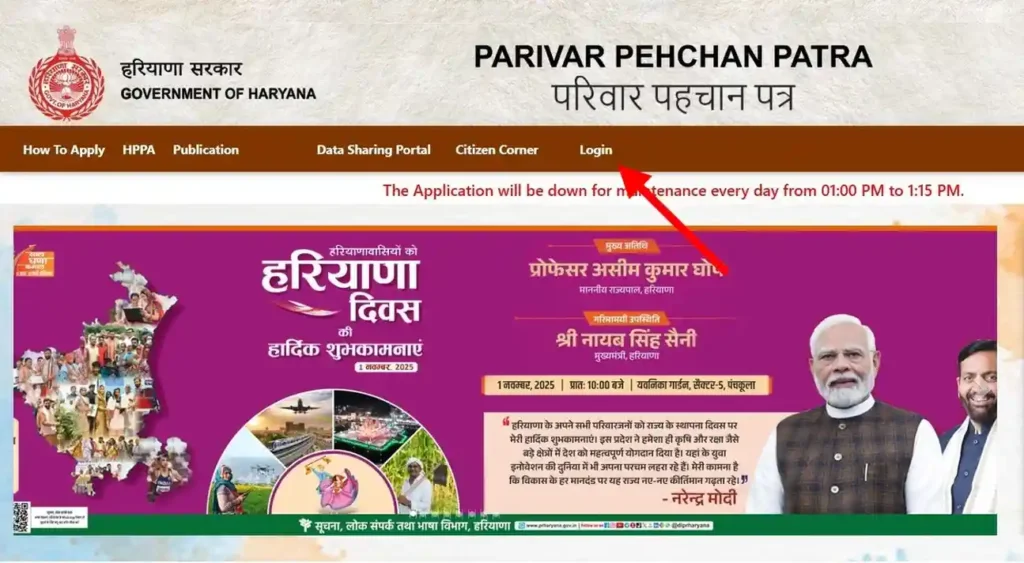
- Visit the Official Portal: Go to ppp-office.haryana.gov.in.
- Locate Citizen Corner: On the top navigation menu, hover over or click “Login.”
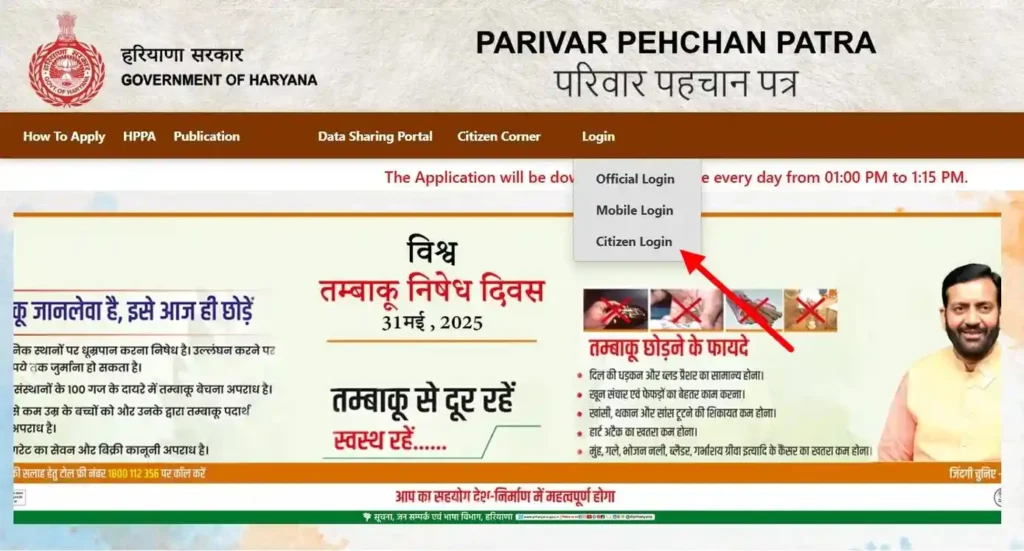
- Select Login Type: Click on “Citizen Login.“
- Identity Prompt: The system will ask, “Do you know Parivar Pehchan Patra (Family ID)?”
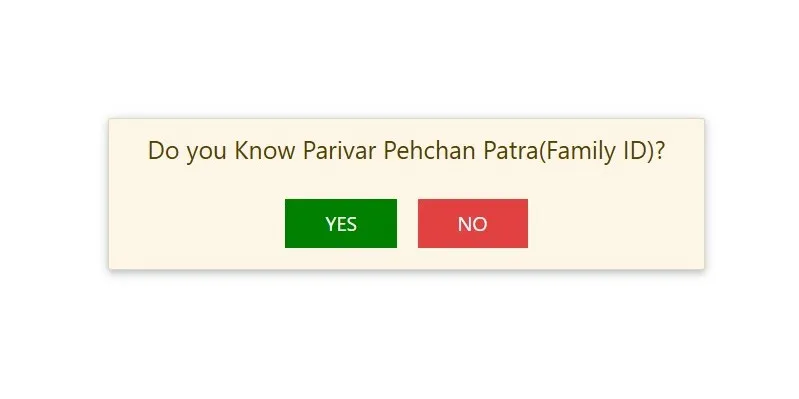
- If Yes: Enter your 8-digit ID.
- If No: You will be prompted to enter the Aadhaar Number of the Head of the Family (HoF).
How to Login via Aadhaar (No Family ID Method)
If you have forgotten your ID or it hasn’t been generated yet, you can still enter the dashboard:
- Select “No” when asked for the Family ID.
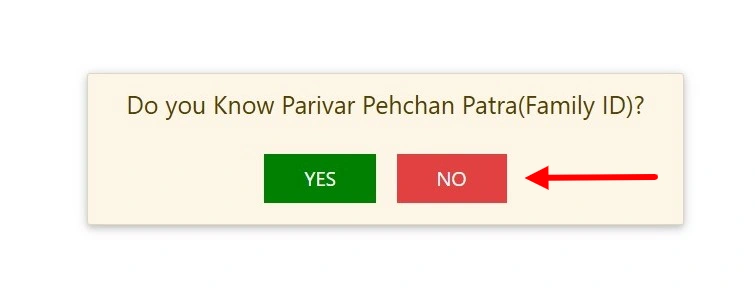
- Enter the Aadhaar Number of any adult family member already registered.
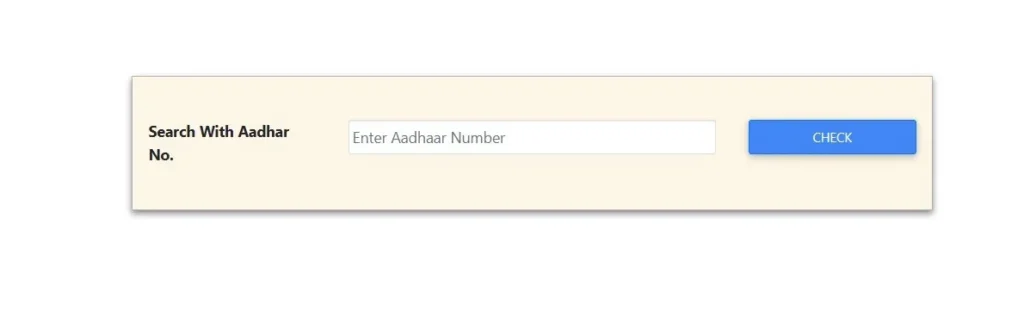
- OTP Verification: A 6-digit code is sent to the mobile number linked to that specific Aadhaar. Once verified, your full family data will be “fetched” from the CRID database.
Troubleshooting “OTP Not Received” on Registered Mobile
This is the most frequent user grievance. If the code doesn’t arrive:
- Check Aadhaar Linking: Ensure your mobile is actually linked to Aadhaar via the UIDAI portal. PPP only sends OTPs to the Aadhaar-registered number, not necessarily the one you use daily.
- DND Settings: Check if your service provider has blocked “Service SMS.”
- Server Maintenance: CRID often performs database syncing between 9:00 PM and 11:00 PM. Avoid logging in during these peak maintenance hours.
How to Register for Family ID Haryana (2026 Process)
Registration today is a two-phase process: Phase 1 is your Self-Declaration, and Phase 2 is the Field Verification by government committees.
Step-by-Step Enrollment Guide
While you can start the process online, a visit to a Saral Kendra or a Common Service Centre (CSC) is often faster for document scanning.
- Start at Citizen Corner: Select “New Registration” on the portal.
- HoF Aadhaar Entry: Enter the Head of Family’s Aadhaar to initiate the file.
- The “Expert” Layer – Self-Declaration: You will fill in details like income, occupation, and property. Note: In 2026, what you enter here is considered a “Self-Declaration” and will be cross-verified against electricity bills and bank records.
- Add Members: Add each member using their Aadhaar. The system will “fetch” names and DOBs automatically.
- Income & Caste Details: Be precise. These fields trigger your eligibility for BPL or Ayushman cards.
- Bank Account Linking: Provide a bank account with NPCI Mapping (Aadhaar Seeded) to ensure you receive government subsidies.
- Document Upload: Upload scanned copies (PDF format, <200KB).
- Final Submission & Print: After submitting, you must print the system-generated form.
- The Critical Final Step: The Head of Family must sign the printed form. You then scan and re-upload the signed copy to move the status from “Draft” to “Pending Verification.”
Mandatory Documents Checklist
Ensure you have these digital copies ready before starting:
- Aadhaar Card: Required for every member (Primary Entity).
- Bank Passbook: Must show the IFSC and Account Number (Required for DBT).
- Voter ID: Mandatory for all members above 18 years.
- Electricity Bill: The Consumer ID on your bill is now the primary contextual signal used to verify your address and “Split Family” eligibility.
- Income/Caste Proof: Needed only if you are claiming specific category benefits.
The Correction Module: Fixing Income, Caste, and Member Details
To initiate a fix, visit the Citizen Corner on the official portal and select “Correction Module.” This is where you challenge the data the government has “pre-verified” for you.
How to Correct Your PPP Income Slab (1.80L – 2.50L Errors)
The most common issue is a family’s income being verified in a higher bracket than reality (e.g., being moved from the 1.80L slab to the 2.50L slab, which results in losing your BPL Ration Card).
- The Verification Logic: Your income is not just “checked”—it is verified by two distinct bodies:
- Local Committee (LC): A 5-member team (including a student and a social worker) that conducts ground-level inquiries.
- Sector Committee (SC): Higher-level officials who cross-match your data with the Income Tax database (CBDT) and your Electricity Bill history.
- How to File a Grievance: If your verified income is wrong, go to the Grievance Redressal Portal. Select the service (e.g., Ration Card) and choose “Income is incorrect.” * The “Evidence” Strategy: You must upload current proof (like a bank statement or an income certificate). Once the grievance is filed, a re-verification by a different Local Committee is triggered.
How to Split or Separate a Family ID Online
Splitting a Family ID is the single most searched query in 2026. The government has tightened the rules to prevent “artificial” family splits intended to lower per-capita income for benefits.
The Electricity Meter Rule for New Family IDs
You cannot split an ID simply by asking. In 2026, the Electricity Meter Rule is the ultimate contextual signal.
- The Core Requirement: To split a family ID, the new unit must have a separate Electricity Connection with a unique Consumer ID.
- How it Works: On the portal, when you choose “Split Family,” the system will ask for your Electricity Consumer Account Number. If that number is already linked to your parent/original Family ID, the request will be automatically rejected.
- Status Update: Once the separate meter is verified, the system allows the “Split” and generates a new 8-digit ID for the new household.
Government Schemes Linked to PPP Haryana 2026
- Social Security & Pensions: The Old Age Samman Allowance, Widow Pension, and Divyang (Disability) Pension are now fully automated. If your age is verified as 60+ and your income is below the threshold, the pension process begins without a separate application.
- Food Security (Ration Cards): The system automatically categorizes you into BPL (Below Poverty Line) or AAY (Antyodaya Anna Yojana) based on the 1.80 Lakh income limit.
- Health Benefits: The Ayushman Chirayu Card offers ₹5 Lakh health coverage. In 2026, families with income up to 3 Lakh can now join this scheme by paying a small annual nominal fee.
2026 Income-to-Benefit Matrix
| Verified Annual Income | Ration Card Category | Health Benefit (Ayushman) | Other Benefits |
| Below ₹1.80 Lakh | BPL / AAY (Yellow/Pink) | Free (₹5 Lakh Cover) | Full Social Security Benefits |
| ₹1.80L to ₹3.00L | No BPL Card | Paid Chirayu (Nominal Fee) | Scholarship Eligibility |
| ₹3.00L to ₹6.00L | General Category | Self-Paid Insurance | Fee Reimbursement (Limited) |
| Above ₹6.00 Lakh | General Category | Standard Health Plans | High-Income Tax Payer Status |
Common Problems & Solutions
- Error: “Member already exists”
- The Cause: This usually occurs if a family member was previously registered in a parent’s ID or an old “Draft” application.
- The Solution: You must first use the “Remove Member” option in the original ID. If you don’t have access to the old ID, visit the ADC (Additional Deputy Commissioner) Office with the member’s original Aadhaar. Only an administrator can “un-map” a member from a locked ID to allow for a new registration.
- Error: “Income not verified”
- The Cause: Your file is likely stuck at the Local Committee (LC) level. Verification typically takes 15–30 days.
- The Solution: Do not submit a new application; it will only create a duplicate error. Check your status on the Mera Parivar portal. If it remains “Pending” for over 30 days, file a grievance on the CM Window or the official Grievance Redressal System (GRS) to trigger an urgent field inquiry.
- Error: “Mobile number mismatch”
- The Cause: The portal only accepts the mobile number currently linked to your Aadhaar.
- The Solution: First, update your mobile number at an Aadhaar Seva Kendra. Once updated in the UIDAI system (usually takes 24–48 hours), use the “Update Mobile” option in the PPP Citizen Corner to sync the new number.
Frequently Asked Questions
Is there a fee for Family ID registration?
No. Registration and updates on the official portal are 100% free. If you visit a Saral Kendra or a CSC, they may charge a nominal government-fixed service fee (usually ₹30–₹50) for scanning and printing.
Can I have two Family IDs?
No. The system is a de-duplicated Aadhaar-based system. Since every ID is linked to a unique Aadhaar number, the portal will block any attempt to create a second ID for the same individual.
How to download the signed PPP PDF for final submission?
Log in to the PPP Portal, click on “Print Form,” and save the generated document as a PDF. Crucial Step: You must print this, have the Head of Family (HoF) sign it physically, scan it (under 200KB), and use the “Upload Signed Document” button to complete your verification.
Important Official Links & District Helpdesks
For the most accurate data and service delivery, always use these verified government gateways:
- Main Portal: meraparivar.haryana.gov.in (Status & Download)
- Update Portal: ppp-office.haryana.gov.in (Corrections & Login)
- Beneficiary Portal: dbtharyana.gov.in (Track your DBT Payments)
District-Wise Assistance
If your digital request is stuck, contact the District Citizen Resources Information Department (CRID) helpdesk located at your local Mini Secretariat (ADC Office).
| District | Contact / Office Location |
| Hisar | Room No. 12, Mini Secretariat, Hisar |
| Gurugram | Vikas Sadan, Near DC Office, Gurugram |
| Rohtak | ADC Office, Mini Secretariat, Rohtak |
| Panchkula | 2nd Floor, Mini Secretariat, Sector 1 |
Conclusion
In today’s digital landscape, your PPP Haryana Family ID has become far more than just a piece of paperwork—it is your family’s gateway to social security, healthcare benefits, and education support. By keeping your data verified and your income slab accurate, you safeguard your access to Haryana’s wider welfare umbrella. Much like how Odisha’s residents rely on schemes such as Subhadra Yojana to secure financial assistance for women, or how citizens ensure clear property rights through transparent records like Bhu Bharathi, Haryana’s families depend on the PPP system to unlock their entitlements. So don’t wait for a scheme deadline to catch you off guard—log in today, verify your status, and stay ahead of the verification curve.